
はじめに
ゴミ出しスケジュールは大きく変わらないものの、年末年始や祝日には変則的になる場合があります。
私の住んでいる自治体では「さんあ〜る」というサービスでゴミ出しスケジュールを提供しており、これを利用して Home Assistant のダッシュボード上に当日・翌日の予定を表示できるようにしました。
この記事では、アプリの通信を解析して取得した JSON データを元に、Home Assistant 上にゴミ出しスケジュールを表示する方法を紹介します。
できたもの
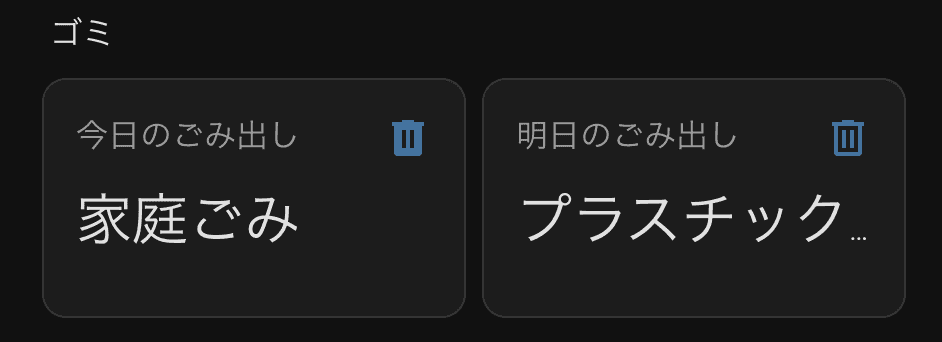
Home Assistant のダッシュボードに「今日」「明日」のゴミ出しスケジュールが表示されます。
予定がない日は「なし」と表示されます。
「さんあ〜る」のデータ構造を調査する
まず、「さんあ〜る」の動作を調べました。
- Web 版 : カレンダー形式(1 ヶ月分のみ)
- アプリ版 :
- 上部 : 翌日の予定
- 下部 : 今週の予定
HTML パースは避けたいので、可能であれば JSON API が欲しいところ。
そこで、
- Web 版 : Chrome DevTools
- アプリ版 : mitmproxy
で通信内容を確認しました。
その結果、アプリ版では以下の API を通して、画像を含むほぼ全データを JSON で受信していることがわかりました。
※ この API は公式公開されているものではなく、アプリの通信内容を解析して取得しています。利用は自己責任でお願いします。
https://threer1.delight-system.com/threeR/api/allData/getData?app_version=i2.8.7&user_id=xxxxxxxxxxxxxxxxx&language_code=ja&jichitai_setting_flag=1&jichitai_info_flag=1&quiz_flag=1&bunbetsu_flag=1&benricho_flag=1&calendar_flag=1&app_info_flag=1user_id は各自の環境に合わせて変更してください。
user_id はアプリから直接確認できる画面はないため、mitmproxy の通信ログなどから取得します。
このデータは画像を base64 文字列として含むため非常に巨大ですが、実際に利用するのは以下の 2 つだけです。
JSON データ構造(抜粋)
calendar_array … 日付とゴミ種別の対応表
{
  "rest_result": {
    "calendar_array": [
      {
        "year": "2025",
        "month": "08",
        "day": "xx",
        "trash_kind_id": 1020,
        "collection_estimated_time": null
      },
      {
        "year": "2025",
        "month": "08",
        "day": "xx",
        "trash_kind_id": 1020,
        "collection_estimated_time": null
      }
    ]
  }
}
trash_kind_array … ゴミ種別 ID の名称
{
  "rest_result": {
    "trash_kind_array": [
      {
        "trash_kind_id": 1020,
        "trash_kind_name": "家庭ごみ",
        "icon_image_name": "filename.png",
        "icon_image": "base64...",
        "display_order": 1,
        "traffic_management_system_trash_kind_id": 0,
        "trash_kind_benricho_array": [
          {
            "benricho_id": 3200,
            "benricho_name": "家庭ごみ(もえる物)"
          }
        ]
      }
    ]
  }
}
カレンダーには数ヶ月分の情報が含まれているため、頻繁に API を叩く必要はありません。
テンプレートセンサーではこの calendar_array と trash_kind_array を使って、
今日・明日のゴミ種別を判定しています。
Home Assistant でゴミ出しスケジュールを表示する
データ取得には RESTful integration を利用します。
configuration.yaml の末尾に以下を追加します。
rest:
  - resource: "https://threer1.delight-system.com/threeR/api/allData/getData?app_version=i2.8.7&user_id=xxxxxxxxxxxx&language_code=ja&jichitai_setting_flag=1&jichitai_info_flag=1&quiz_flag=1&bunbetsu_flag=1&benricho_flag=1&calendar_flag=1&app_info_flag=1"
    scan_interval: 2592000 # 30日
    sensor:
      - name: "3RCalendar"
        value_template: "OK"
        json_attributes:
          - rest_result
calendar_array に数ヶ月分のデータが入っているため、毎日の更新は不要です。
そのため scan_interval は 30 日に設定しています。
続いて、テンプレートセンサーで「今日」「明日」の予定を作成します。
テンプレートセンサーでは、取得した JSON から今日・明日のゴミ種別を抽出し、文字列として状態に設定します。
template:
  - sensor:
      - name: "今日のごみ出し"
        icon: mdi:trash-can
        state: >
          {% set rr = state_attr('sensor.3RCalendar', 'rest_result') %}
          {% if not rr %}
            データ未取得
          {% else %}
            {% set cl = rr.calendar_array %}
            {% set tk = rr.trash_kind_array %}
            {% if not cl or not tk %}
              データ未取得
            {% else %}
              {% set y, m, d = now().strftime('%Y-%m-%d').split('-') %}
              {% set ids = cl
                  | selectattr('year', 'eq', y)
                  | selectattr('month', 'eq', m)
                  | selectattr('day', 'eq', d)
                  | map(attribute='trash_kind_id')
                  | list %}
              {% if ids | length == 0 %}
                なし
              {% else %}
                {% set names = tk
                    | selectattr('trash_kind_id', 'in', ids)
                    | map(attribute='trash_kind_name')
                    | list %}
                {{ names | join('・') }}
              {% endif %}
            {% endif %}
          {% endif %}

  - sensor:
      - name: "明日のごみ出し"
        icon: mdi:trash-can-outline
        state: >
          {% set rr = state_attr('sensor.3RCalendar', 'rest_result') %}
          {% if not rr %}
            データ未取得
          {% else %}
            {% set cl = rr.calendar_array %}
            {% set tk = rr.trash_kind_array %}
            {% if not cl or not tk %}
              データ未取得
            {% else %}
              {% set y, m, d = (now() + timedelta(days=1)).strftime('%Y-%m-%d').split('-') %}
              {% set ids = cl
                  | selectattr('year', 'eq', y)
                  | selectattr('month', 'eq', m)
                  | selectattr('day', 'eq', d)
                  | map(attribute='trash_kind_id')
                  | list %}
              {% if ids | length == 0 %}
                なし
              {% else %}
                {% set names = tk
                    | selectattr('trash_kind_id', 'in', ids)
                    | map(attribute='trash_kind_name')
                    | list %}
                {{ names | join('・') }}
              {% endif %}
            {% endif %}
          {% endif %}
この状態で HomeAssistant を再起動するとエンティティが追加されます。
ダッシュボード上にエンティティを表示すればいつでも確認できるようになります。
まとめ
Home Assistant のダッシュボードにゴミ出しスケジュールを表示できるようになりました。
スマホアプリのウィジェットにも追加できるため、簡単に確認できて便利です。
Alexa に「今日のゴミ何?」と聞けるような連携も試したいところですが、現状では簡単に実現できる方法が見つかっていません。
今後も良い連携方法を模索していきたいと思います。
おしまい。
